# Report Development: Underlying Data
#### Previous Section: [Cards](Report+Development+Cards)
---
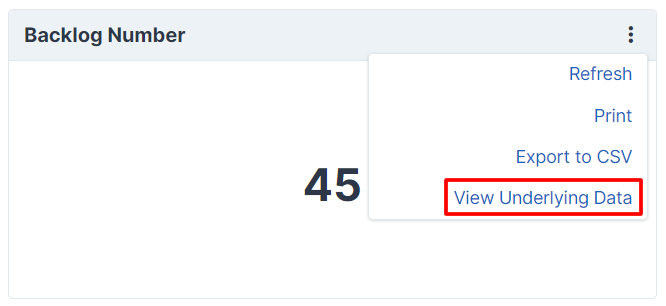
To get a better understanding of a data point in a card, you can show the underlying data related to it.
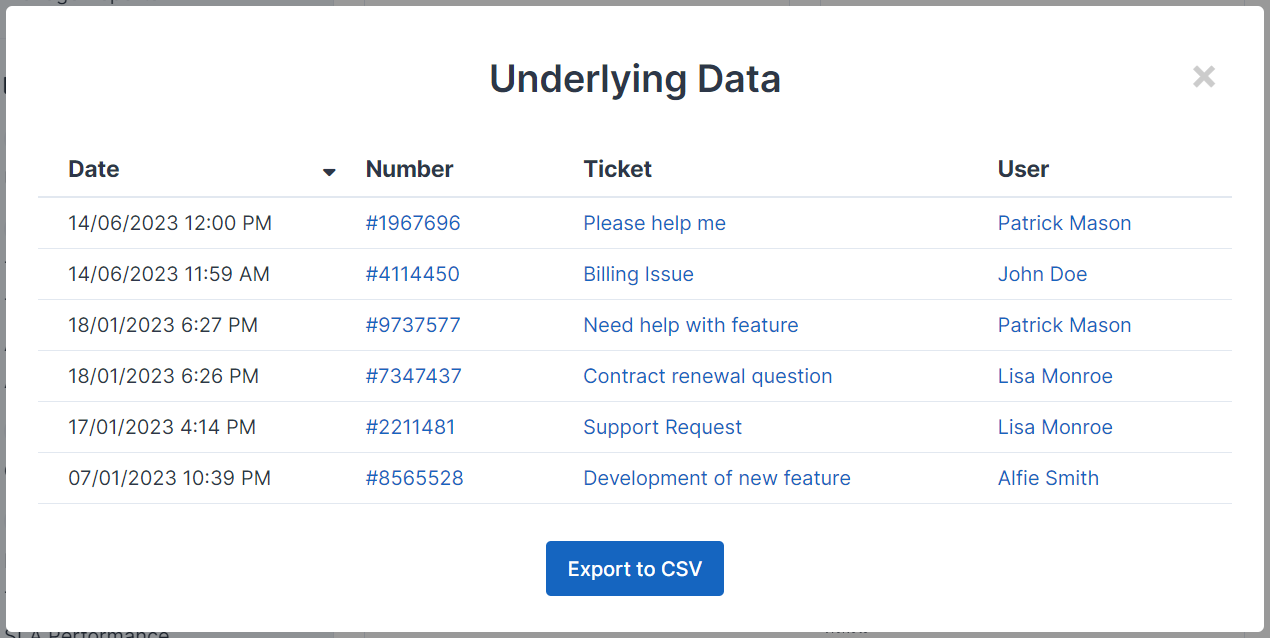
A common scenario where this is useful is if your report relates to a number of tickets. The underlying data option will let you display a list of the specific tickets the data in the card relates to. You have full control on the columns and data shown, and it can be used outside of tickets too.
## Implementing Underlying Data
To enable the "View underlying data" option, your card must implement the `\App\Modules\Report\Addon\Dashboards\Cards\UnderlyingData` interface. The card will then need to implement two methods, `underlyingDataQuery` and `underlyingDataTableColumns`.
### Query
The query will usually be similar to your main card query. With a HTML or number card where there is usually just one data point, it may be the exact same query.
```
public function underlyingDataQuery(\App\Http\Requests\Request $request): \Illuminate\Database\Eloquent\Builder
{
return QueryBuilder::for(Ticket::class)
->applyFilters($this->dashboard()->filters('ticket.created_at'))
->where('ticket.status_id', '<>', Config::get('settings.default_resolved_status'))
->where('ticket.last_reply_time', '<', now()->subDays(7)->getTimestamp())
->select('ticket.*');
}
```
#### Drill Into
You might be interested to see the underlying data for a specific data point, be it clicking on a point in a chart card or a row in a table card, you can do this with drilling into the underlying data.

The `underlyingDataQuery` method contains the request data as a parameter, this will contain the data point data, such as label and value. We can apply these to filter our query more specifically.
```
public function underlyingDataQuery(\App\Http\Requests\Request $request): \Illuminate\Database\Eloquent\Builder
{
$query = QueryBuilder::for(Ticket::class)
->applyFilters($this->dashboard()->filters('ticket.created_at'))
->where('ticket.status_id', '<>', Config::get('settings.default_resolved_status'))
->where('ticket.last_reply_time', '<', now()->subDays(7)->getTimestamp());
if ($request->has('value')) {
$query->where('ticket.department_id', $request->integer('value'));
}
return $query->select('ticket.*');
}
```
The data in the request will vary depending on the chart type or table data. Most requests will usually contain a `value` field, charts will usually additionally contain a `label` field too. The `value` field may be split if there are multiple axes, for example `value.x` and `value.y` such as in a stacked line graph.
##### Value Key
If we're using string names in our charts (custom object dataset) or have multiple columns in our table, it's not always obvious what we want to filter by when we're drilling into and this is where the value key is important. It defaults to the `id` attribute by default, but for a table that is split by department, we usually want to use `department_id` attribute as the value for the row.
```
public function getUnderlyingDataValueKey(): string
{
return 'department_id';
}
```
### Table Columns
The `underlyingDataTableColumns` method must return an array of `\App\Modules\Report\Addon\Dashboards\Cards\Table\Column` instances.
#### Available Columns
A number of predefined columns are available that you can use directly in your underlying data table.
Column Class Example Output Self-Service Article Date `\App\Modules\Report\Addon\Dashboards\UnderlyingData\Columns\Selfservice\ArticleCreatedAtColumn` 25/01/2023 4:00 PM Article Title `\App\Modules\Report\Addon\Dashboards\UnderlyingData\Columns\Selfservice\ArticleTitleColumn` [This is an Article Title](#) Article Feedback Rating `\App\Modules\Report\Addon\Dashboards\UnderlyingData\Columns\Selfservice\FeedbackRatingColumn` Good Article Feedback Date `\App\Modules\Report\Addon\Dashboards\UnderlyingData\Columns\Selfservice\FeedbackUpdatedAtColumn` 25/01/2023 4:00 PM Article Feedback View `\App\Modules\Report\Addon\Dashboards\UnderlyingData\Columns\Selfservice\FeedbackViewColumn` View Feedback Ticket Ticket Feedback Rating `\App\Modules\Report\Addon\Dashboards\UnderlyingData\Columns\Ticket\FeedbackRatingColumn` Good Ticket Feedback Date `\App\Modules\Report\Addon\Dashboards\UnderlyingData\Columns\Ticket\FeedbackUpdatedAtColumn` 25/01/2023 4:00 PM Ticket Feedback View `\App\Modules\Report\Addon\Dashboards\UnderlyingData\Columns\Ticket\FeedbackViewColumn` View Feedback Ticket Brand `\App\Modules\Report\Addon\Dashboards\UnderlyingData\Columns\Ticket\TicketBrandColumn` ACME Limited Ticket Channel `\App\Modules\Report\Addon\Dashboards\UnderlyingData\Columns\Ticket\TicketChannelColumn` Web Ticket Created Date `\App\Modules\Report\Addon\Dashboards\UnderlyingData\Columns\Ticket\TicketCreatedAtColumn` 25/01/2023 4:00 PM Ticket Department `\App\Modules\Report\Addon\Dashboards\UnderlyingData\Columns\Ticket\TicketDepartmentColumn` Support Ticket Number `\App\Modules\Report\Addon\Dashboards\UnderlyingData\Columns\Ticket\TicketNumberColumn` [\#123456](#) Ticket Priority `\App\Modules\Report\Addon\Dashboards\UnderlyingData\Columns\Ticket\TicketPriorityColumn` Low Ticket Reopened Date `\App\Modules\Report\Addon\Dashboards\UnderlyingData\Columns\Ticket\TicketReopenedTimeColumn` 25/01/2023 4:00 PM Ticket Resolved Date `\App\Modules\Report\Addon\Dashboards\UnderlyingData\Columns\Ticket\TicketResolvedTimeColumn` 25/01/2023 4:00 PM Ticket Status `\App\Modules\Report\Addon\Dashboards\UnderlyingData\Columns\Ticket\TicketStatusColumn` Open Ticket Subject `\App\Modules\Report\Addon\Dashboards\UnderlyingData\Columns\Ticket\TicketSubjectColumn` [Ticket Subject](#) Ticket Tags `\App\Modules\Report\Addon\Dashboards\UnderlyingData\Columns\Ticket\TicketTagsColumn` [Tag One, Tag Two](#) Ticket User Name `\App\Modules\Report\Addon\Dashboards\UnderlyingData\Columns\Ticket\UserFormattedNameColumn` [John Doe](#) User User Country `\App\Modules\Report\Addon\Dashboards\UnderlyingData\Columns\User\UserCountryColumn` United Kingdom User Created Date `\App\Modules\Report\Addon\Dashboards\UnderlyingData\Columns\User\UserCreatedAtColumn` 25/01/2023 4:00 PM User Name `\App\Modules\Report\Addon\Dashboards\UnderlyingData\Columns\User\UserFormattedNameColumn` [John Doe](#) The below example uses a few of these columns.
```
public function underlyingDataTableColumns(): array
{
return [
new \App\Modules\Report\Addon\Dashboards\UnderlyingData\Columns\Ticket\TicketCreatedAtColumn,
new \App\Modules\Report\Addon\Dashboards\UnderlyingData\Columns\Ticket\TicketNumberColumn,
new \App\Modules\Report\Addon\Dashboards\UnderlyingData\Columns\Ticket\TicketSubjectColumn,
new \App\Modules\Report\Addon\Dashboards\UnderlyingData\Columns\Ticket\UserFormattedNameColumn,
];
}
```
#### Custom Columns
If one of the above columns doesn't fit your requirements, you can define your own column in the same way as you would in a [table card](Report+Development+Cards#table-columns).
```
$column = (new \App\Modules\Report\Addon\Dashboards\Cards\Table\Column('Date'))
->setId('date')
->setDefinition(['width' => '180px'])
->setValue(function ($model) {
return formatDate($model->created_at);
});
```
### Table Options
The table is loaded using [Datatables](https://datatables.net/manual/options), should you need to change any of the default options you can declare this using the `underlyingDataTableOptions` method.
```
public function underlyingDataTableOptions(): array
{
return ['ordering' => false];
}
```
## Examples
### Example - HTML Card
Reports/Cards/Overview/BacklogByPriorityChart.php
```
baseQuery()->count();
}
protected function baseQuery(): Builder
{
return QueryBuilder::for(Ticket::class)
->applyFilters($this->dashboard()->filters('ticket.created_at'))
->where('ticket.status_id', '<>', Config::get('settings.default_resolved_status'));
}
public function underlyingDataQuery(Request $request): Builder
{
return $this->baseQuery()->select('ticket.*');
}
public function underlyingDataTableColumns(): array
{
return [
new TicketCreatedAtColumn,
new TicketNumberColumn,
new TicketSubjectColumn,
new UserFormattedNameColumn,
];
}
}
```
### Example - Chart Card (with Drill Into)
Reports/Cards/Overview/BacklogByPriorityChart.php
```
baseQuery()
->join('ticket_priority', 'ticket_priority.id', '=', 'ticket.priority_id')
->groupBy('ticket.priority_id')
->select('ticket_priority.name', 'ticket.priority_id')
->selectRaw('COUNT(*) as aggregate')
->orderBy('ticket_priority.order')
->getQuery()
->get();
$dataset = new CustomObjectDataset($data->map(fn($v) => (array) $v)->all(), 'aggregate', 'name');
return (new DataStructure(ChartType::BAR, $dataset))
->setLabels($data->pluck('name')->toArray())
->setAxisNames(trans_choice('ticket.ticket', 2), trans_choice('ticket.priority', 1))
->setOptions([
'indexAxis' => 'y',
'plugins' => [
'legend' => ['display' => false]
],
'scales' => [
'x' => [
'ticks' => ['precision' => 0],
],
]
]);
}
protected function baseQuery(): Builder
{
return QueryBuilder::for(Ticket::class)
->applyFilters($this->dashboard()->filters('ticket.created_at'))
->where('ticket.status_id', '<>', Config::get('settings.default_resolved_status'));
}
public function underlyingDataQuery(Request $request): Builder
{
$query = $this->baseQuery();
if ($request->has('value')) {
$query->where('ticket.priority_id', $request->integer('value'));
}
return $query->select('ticket.*');
}
public function underlyingDataTableColumns(): array
{
return [
new TicketCreatedAtColumn,
new TicketNumberColumn,
new TicketSubjectColumn,
new UserFormattedNameColumn,
];
}
public function getUnderlyingDataValueKey(): string
{
return 'priority_id';
}
}
```